After reading this article, you’ll know the mobile operating systems and associated app stores worthy of creating and maintaining app store developer accounts.
You’ll also be equipped with a step-by-step account creation guide for both the Apple Developer Program and the Google Play Developer Account.
Mobile Operating Systems
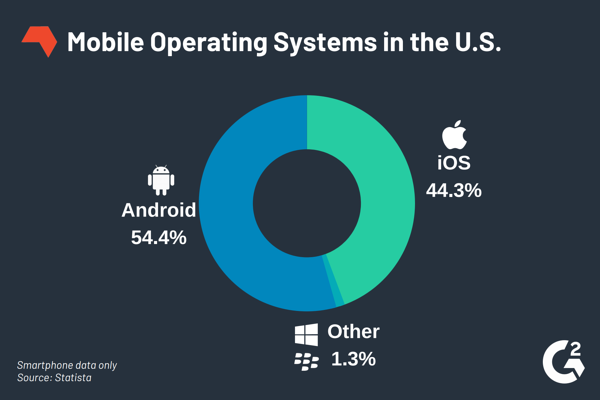
To understand what mobile developer accounts are needed, we’ll start by understanding the mobile operating systems. Within the U.S., Android and iOS account for 98.7% of the mobile operating systems.
App Stores
Users download apps to their phones from app stores. The most popular app stores are Google Play Store for Android and the Apple App Store for iOS. The mobile developer accounts are associated with each app store.
The following sections walk through step-by-step developer account creation for each of the app stores.
Apple Developer Program
There are two types of Apple Developer Program memberships, Individuals and Organizations. For more background on membership comparisons, check out this article.
The first step to either membership type is creating an Apple ID.
The application process for Individuals is straightforward and does not require Apple review.
The process for Organizations requires the following.
Step 1: Application
- Apple ID with two-factor authentication turned on
- D-U-N-S Number (step-by-step instructions for retrieving a D-U-N-S Number)
- Email associated with company domain (i.e., cannot use @gmail.com, @yahoo.com, etc.)
- Website domain
- Verification Contact Details
- Full Name
- Email Address
- Phone Number
Step 2: Apple review/verification (~2 days)
The verification contact should expect a call from Apple to verify the applicant has the authority to bind the organization to Apple Developer Program legal agreements
Shortly thereafter (typically within 15 minutes), the applicant should expect a call from Apple. This call will include confirmation of application details, employment status at organization, authority to bind the organization to Apple Developer Program legal agreements, and discussion on relation between organization entity and Website (particularly if organization entity and Website domain name are not identical). Apple may ask if a tradename or DBA (Doing Business As) is in place for the Website domain. One acceptable answer is the entity owns the Website domain.
Step 3: Program Incense Agreement
Irrespective of the membership type, an Apple Developer Program account costs $99/year.
Whether you’re an individual or part of an organization, when you’re ready to create an Apple Developer Program membership, follow the instructions here.
Google Play Developer Account
Step 1: Sign up for a Google Play Developer account
You must be at least 18 years of age to sign up for a Google Play Developer account.
- Using your Google Account, sign up for a Developer account.
- Once you have a Developer account, you can use the Play Console to publish and manage your apps.
Step 2: Accept the Developer Distribution Agreement
During the sign up process, you’ll need to review and accept the Google Play Developer Distribution Agreement.
Step 3: Pay registration fee
There is a $25 USD one-time registration fee.
Step 4: Complete your account details
Type your account details. Be aware, your “Developer name” is displayed to customers on Google Play.
You can add more account information after you’ve created your account.
If you’re planning to create paid apps or in-app products, you’ll need to set up a merchant account. This includes:
- Payments profile
- Customer info
- Account type
- Name and address
- Primary contact
- Public merchant profile
- Public business information
- Website (optional)
- What do you sell
- Public business information
- Customer support email
- Credit card statement name (This text will be appended to “Google*” and appear on your buyers’ credit card statements.)